
Top Features of LineageOS 22: Enhancements and Innovations

 4 min. read
 Updated on
Custom ROM updates don’t usually generate much excitement. Most bring minor tweaks and bug fixes without changing daily use. LineageOS 22 breaks this pattern. Built on Android 15 QPR1, this release arrived faster than any previous version and packs genuine improvements.
The LineageOS 22 best features focus on practical additions rather than flashy gimmicks. From a rebuilt music player to enhanced security tools, this update proves custom ROMs can innovate faster than manufacturers. Over 100 devices gained support at launch.
What’s New in LineageOS 22
LineageOS 22, officially versioned as 22.1, launched in December 2024. The release bases itself on Android 15 QPR1, which explains the decimal versioning. Google’s shift to Quarterly Platform Releases means LineageOS now follows the same pattern.
This marks the fastest LineageOS release in project history. The team completed it just three months after Google released the source code for Android 15. Security patches through December 2024 are included.
The Best LineageOS 22 Features
These additions represent the most significant improvements in LineageOS 22. Each feature addresses real user needs rather than adding complexity for its own sake.
Twelve Music Player
The aging Eleven music player finally got replaced. Twelve represents a complete rebuild with modern design and functionality.
- Material You theming adapts to your wallpaper colors automatically
- Landscape mode support works properly on tablets and foldable devices
- Music server integration includes Subsonic and Jellyfin support
Twelve handles more audio formats, including lossless options like FLAC. The new floating player UI puts playback speed controls, equalizer settings, and queue management in easy reach. The app ditches hidden menus for upfront controls.
Camelot PDF Reader
LineageOS 22 bundles a native PDF reader for the first time. Jelly browser couldn’t handle PDFs reliably.
- Uses the same Jetpack PDF library as Google Chrome
- Lightweight design loads documents quickly
- No network permissions or unnecessary features
Camelot solves a specific problem without overcomplicating things. You tap a PDF, it opens, and you read it. The simplicity keeps it fast and reliable.
Enhanced Device Support
LineageOS 22’s best features include unprecedented device compatibility. The project supports over 100 devices at launch.
- Pixel 2 through Pixel 9 series all supported
- Older flagship devices from Samsung, OnePlus, and Xiaomi included
- Devices abandoned by manufacturers in 2020 now run Android 15
The development cycle proved easier than previous releases. Fewer breaking changes meant faster device bringup. This efficiency translates to better long-term support for aging hardware.
Updated Security Framework
Security patches through December 2024 protect against the latest vulnerabilities. LineageOS 22 maintains monthly security updates even for abandoned devices.
- November and December 2024 security patches integrated
- Regular updates continue throughout the version’s lifecycle
- Older devices get protection manufacturers won’t provide
Android 15’s improved permission system gives users finer control over app access. Privacy indicators show when apps use your camera or microphone.
Improved Download Portal
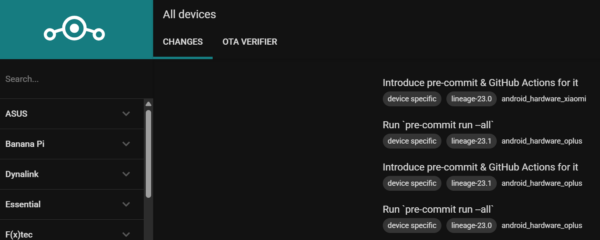
The LineageOS download page received its first major redesign with dark theme support and file verification tools.
- Native dark mode reduces eye strain
- Additional device images are available directly
- Verify downloaded files, even from unofficial sources
The new portal makes finding your device faster with improved search functionality and clearer compatibility information.
Performance Optimizations
Behind-the-scenes improvements make LineageOS 22 run smoother. Extract utilities received complete rewrites that dramatically speed up device maintenance.
- Device extraction times dropped from 180 seconds to 30 seconds
- Python rewrite improves performance by 30x overall
- VirtIO support enables QEMU, crosvm, and UTM targets
These improvements help maintainers work faster, which means updates arrive quicker. Users benefit from reduced installation times and more responsive system performance.
WebView and App Updates
Core system components received updates that improve compatibility and security. WebView updated to Chromium 131.
- Chromium 131 includes performance improvements and security fixes
- SeedVault backup tool updated to the newest version
- The Etar calendar app received the latest features
These updates ensure modern web browsing and reliable app experiences on older devices.
The Bottom Line
LineageOS 22 proves custom ROMs remain relevant in 2025. The update arrived faster than any previous version while supporting more devices and adding genuinely useful features. Twelve music player and Camelot PDF reader solve real problems users face daily. The LineageOS 22 best features balance innovation with stability. If your device appears on the supported list, this update extends its useful life by years. Manufacturers abandon phones after two or three years, but LineageOS keeps them secure and current. That matters more than any flashy new feature.


Improve this guide
User forum
0 messages