
How to Download Sora 2 on Android (Easy Step-by-Step Guide)

 3 min. read
 Published on
Sora 2 — OpenAI’s powerful AI-powered video creation and social platform — has become one of the most talked-about apps of 2025. Originally launching first on iOS, it’s now rolling out on Android, giving millions of users the ability to generate videos, remix content, and interact with AI creativity from their phones.
This guide will walk you through how to download and install Sora 2 on Android, plus options if it’s not yet available in your country.
What Is Sora 2? Brief Overview
Sora 2 is an advanced AI-driven video creation tool from OpenAI that lets you:
- Generate AI video clips from text prompts
- Remix and edit other videos
- Create social content in a scrolling feed format
- Use features like “characters” to place yourself in AI-generated scenes
The app quickly became popular after launch, with millions of downloads and widespread use on mobile devices.
Is Sora 2 Available on Android?
Yes — Sora 2 is now available for Android devices in select regions, including the United States, Canada, Japan, South Korea, Taiwan, Thailand, and Vietnam via the Google Play Store.
Note: However, availability may vary by country, and in some regions the app may still be rolling out gradually.
How to Download Sora 2 on Android (Official Method)
Follow these steps to install Sora 2 from the Google Play Store:
1. Open Google Play Store
Unlock your Android phone and open the Google Play Store app.
2. Search for “Sora by OpenAI”
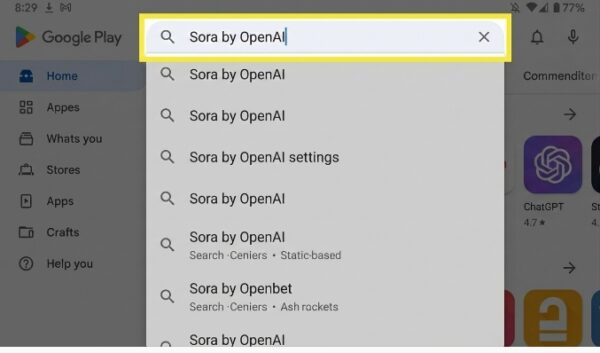
In the search bar at the top, type:
Sora by OpenAI
Look for the official app from OpenAI — typically verified with the developer name.
3. Tap Install
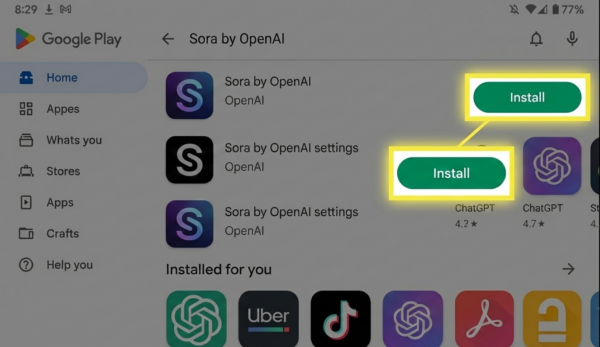
Once you find the app:
- Tap Install
- Wait for the download and installation to complete
Note: If the app isn’t visible or does not show an install button, it may not be available in your country yet. See the “What If You Can’t Download” section below.
4. Open the App
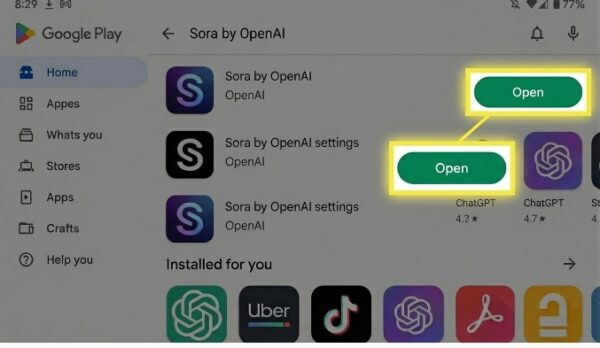
After installation:
- Tap Open
- Sign in with your OpenAI account (use your ChatGPT credentials)
- Follow any setup or onboarding prompts
- Start exploring Sora 2’s AI video features
What If Sora 2 Isn’t Available in Your Country?
If you can’t find or download the app from the Google Play Store, here are your options:
Option 1: Use Your Mobile Browser
You can access Sora 2 via its web interface on Android browsers like Chrome or Firefox even without installing the app.
Simply visit: https://sora.com
Log in with your OpenAI account and use Sora 2 directly from the browser.
Option 2: Pre-Register or Wait for Rollout
Some Android users see a Pre-Register option on the Play Store if the app isn’t fully released yet in their region. Tap Pre-Register to get notified when the app becomes available.
Option 3: Use VPN (Advanced)
Some users choose to connect through a VPN to regions where the app is available, but this can have mixed results and may violate terms of service. Proceed with caution.
Safety & Fake App Warning
Be careful of unofficial Sora 2 APK downloads circulating online — these are not official and can contain malware or misuse your data. Always use the Google Play Store or the official web interface at sora.com.
Tips Before Installing
- Make sure your Android device is running Android 6.0 or later (recommended).
- Ensure a stable Wi-Fi connection for smoother downloads.
- Sign in with the same OpenAI account you use for ChatGPT if you have one.


Improve this guide
User forum
0 messages