
LineageOS Download: Complete Installation Guide

 4 min. read
 Updated on
Stock Android comes loaded with bloatware, stops receiving updates after a few years, and tracks your activity constantly. LineageOS download offers an escape. This open-source Android operating system removes unnecessary apps, extends your device’s lifespan with continued security updates, and gives you control over privacy.
What is LineageOS
LineageOS is a free, open-source Android operating system that replaces your phone’s stock firmware. It’s the continuation of CyanogenMod, which shut down in 2016. Community developers maintain Lineage OS, with each device having a dedicated maintainer.
The system strips away manufacturer bloatware and Google services by default. Security updates arrive monthly for supported devices, even years after manufacturers stop providing them. As of January 2026, LineageOS supports over 190 devices.
Where to Download LineageOS
LineageOS downloads must come from official sources to ensure you get legitimate, safe files. Third-party sites may distribute modified versions containing malware or compromised code.
Finding Your Device and Downloading the ROM
Visit wiki.lineageos.org/devices to check if your device is supported. Search for your exact model number. For example, the Samsung Galaxy S21 and Galaxy S21 FE require different builds. Click your device name to access its wiki page with installation notes and requirements.
Navigate to download.lineageos.org and find your device. Download the latest build file (.zip) and the LineageOS Recovery image (.img). Files typically range from 500MB to 1GB, and you can verify downloads using SHA256 checksums provided on the download page.
Prerequisites Before Installation
Installing LineageOS requires preparation. Skipping these steps leads to installation failure or data loss.
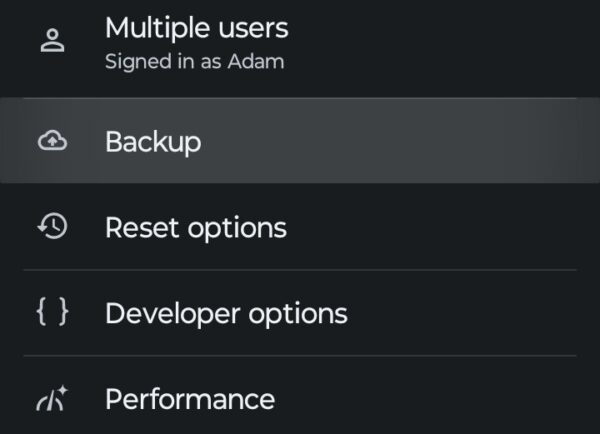
Backup Everything
Unlocking your bootloader erases all data. Back up photos, contacts, and files to cloud storage or your computer.
Unlock Your Bootloader
Bootloader unlocking varies by manufacturer. Visit your manufacturer’s website for specific instructions. This voids your warranty.
Install ADB and Fastboot
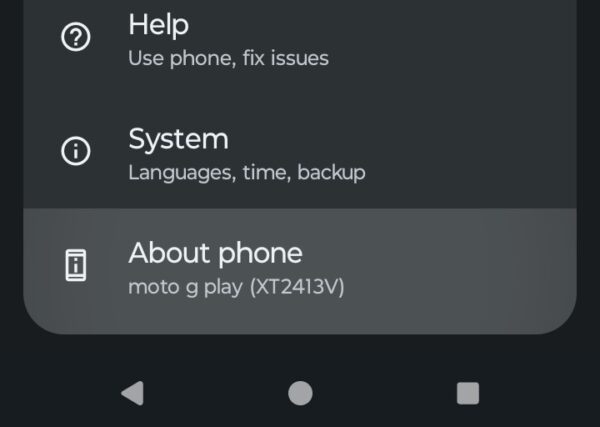
Download Android SDK Platform Tools from Google’s developer website. Extract the tools to an accessible folder. On your smartphone, you’ll need to enable developer options.
- Go to Settings, About phone.
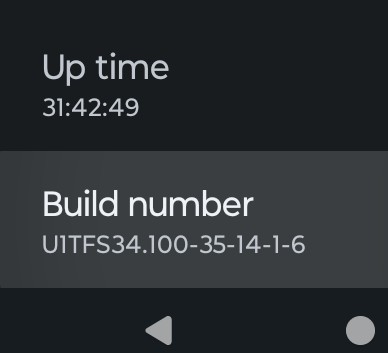
- Scroll down and tap Build number seven times. This will enable USB debugging and OEM unlocking in Developer options.
How to Install Lineage OS
Installation steps vary significantly by device. What works for a Samsung phone differs completely from a Google Pixel or OnePlus device. The official LineageOS wiki provides device-specific instructions that you must follow exactly.
CRITICAL: Always use official wiki instructions for your specific device. Do NOT follow generic guides.
The installation follows this general pattern:
- Boot into fastboot mode (varies by device, often Volume Down + Power)
- Install LineageOS Recovery using fastboot commands from your device’s wiki
- Boot into recovery mode (typically Volume Up + Power)
- Factory reset/wipe data, cache, and system partitions
- Install the LineageOS zip file via recovery
- Install Google Apps immediately if desired (BEFORE first boot)
- Reboot (first boot takes 5-15 minutes)
Your device may require additional steps, like specific firmware versions or special partition formatting. Check your device’s wiki page for complete instructions.
The Bottom Line
LineageOS download and installation breathes new life into phones manufacturers abandoned. The process requires technical comfort and careful attention to official documentation. Follow your device’s wiki instructions precisely, back up your data, and take your time reading each step.
Most bricked phones result from skipping steps or using the wrong files. The LineageOS wiki updates constantly. Check your device’s page before installation and updates. The community maintains active forums for troubleshooting help.
Yes, when downloaded from official sources at download.lineageos.org. Never download LineageOS from third-party sites, forums, or file-sharing services. These may contain malware or compromised builds.
Yes, unlocking your bootloader voids manufacturer warranties on most devices. Some manufacturers like OnePlus and Motorola support custom ROM communities and may be more lenient, but warranty loss is standard.
Yes. You can flash your device’s original stock ROM to return to the manufacturer’s software. The process varies by manufacturer. Search for your device’s stock firmware and flashing instructions.
No. Root access is not required for LineageOS installation. LineageOS does not include root access by default, though you can optionally install the LineageOS su addon after installation if you need root.
Most apps work perfectly. Banking apps and apps requiring SafetyNet verification may fail since LineageOS doesn’t pass Google’s integrity checks. Some DRM-protected content won’t play.


Improve this guide



User forum
0 messages