
NFC on Android: Complete Guide to Understanding and Using It

 6 min. read
 Published on

If you’re wondering what is NFC on Android, you’re looking at one of the most useful features built into modern smartphones. NFC stands for Near Field Communication, and it’s the technology that lets you tap your phone to make payments, share files, and connect to devices instantly.
NFC has been around for years, but many Android users don’t realize their phone has it or know how to use it. Once you understand what NFC does and how to enable it, you’ll find dozens of ways to use it daily.
NFC Technology Explained
NFC is a wireless technology that allows two devices to communicate when they’re very close together, usually within a few centimeters. It works similarly to Bluetooth but with a much shorter range and faster connection time. You don’t need to pair devices or enter passwords. Just tap and go.
The technology uses electromagnetic radio fields to transfer data between devices. One device acts as the transmitter and the other as the receiver. Your Android phone can function as both, which means you can use NFC to send information to other devices or receive it from NFC tags and terminals.
NFC operates at 13.56 MHz and can transfer data at speeds up to 424 kbit/s. That’s slow compared to Wi-Fi or Bluetooth, but NFC isn’t designed for large file transfers. It excels at quick exchanges like payment authentication, pairing Bluetooth devices, or sharing contact information.
Method Comparison: NFC vs. Bluetooth
| Feature | NFC | Bluetooth |
|---|---|---|
| Range | Up to 4 cm | Up to 100 meters |
| Speed | Up to 424 kbit/s | Up to 3 Mbit/s |
| Pairing Time | Instant | Several seconds |
| Use Cases | Payments, quick data exchange | File transfer, audio streaming |
| Power Consumption | Low | Moderate to high |
What is NFC on Android?
NFC on Android is a built-in feature that lets your phone interact with other NFC-enabled devices and tags. Most Android phones manufactured after 2015 include NFC hardware. You’ll find it in flagship phones from Samsung, Google, OnePlus, and other major manufacturers.
Your phone uses NFC for multiple purposes. Mobile payments through Google Pay or Samsung Pay rely entirely on NFC technology. When you tap your phone at a payment terminal, NFC transmits your encrypted payment information securely. You can also use Android NFC to share photos, contacts, and files with other Android devices by tapping them together.
How to Use NFC with Android Devices
Using NFC on Android starts with enabling the feature in your settings. Most phones have NFC turned off by default to save battery life, though the power consumption is minimal. Once you enable it, your phone can immediately start interacting with NFC tags and devices.
Turn on NFC
The process to enable NFC is straightforward and takes just a few seconds.
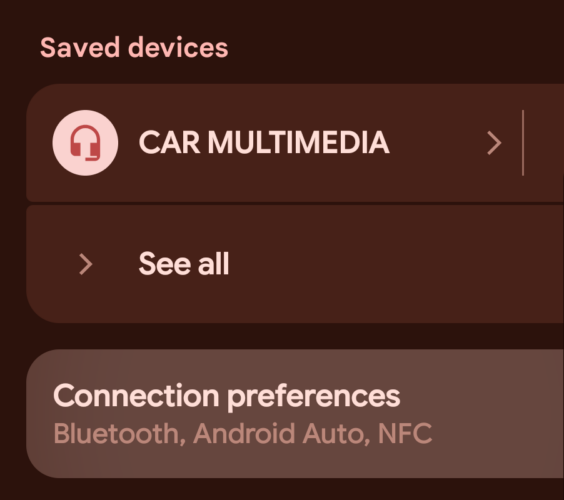
- Open Settings and go to Connected Devices, Connection Preferences
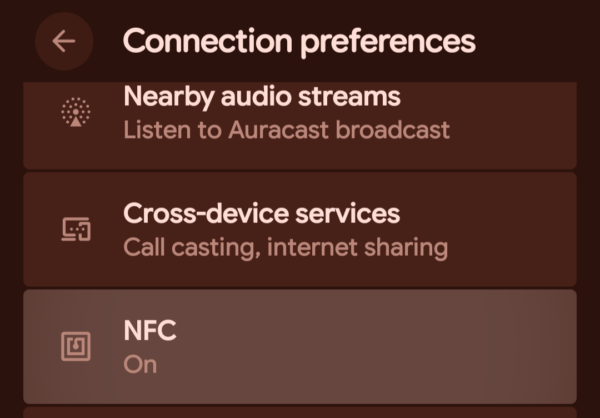
- Select NFC from the options
- Toggle the NFC switch
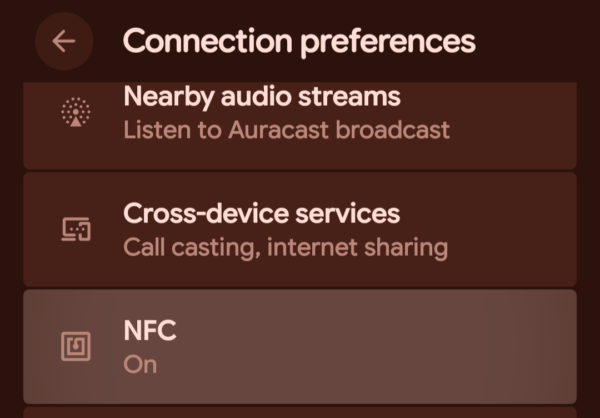
Some Android manufacturers place NFC settings in different locations. Samsung devices might have it under Connections, while other brands might put it directly in the main Settings menu. If you can’t find it, use the search function in Settings and type “NFC” to locate it quickly. Once NFC is enabled, you’ll usually see a small NFC icon in your status bar indicating the feature is active and ready to use.
Using NFC for Payments
Mobile payments are the most popular use for NFC on Android. Google Pay works on virtually all NFC-enabled Android phones, while Samsung Pay is available on Samsung devices. Setting up mobile payments takes just minutes and eliminates the need to carry physical credit cards.
Download Google Pay or your phone manufacturer’s payment app from the Google Play Store. Open the app and add your credit or debit card by taking a photo of it or entering the details manually. Your bank might require additional verification through a text message or phone call.
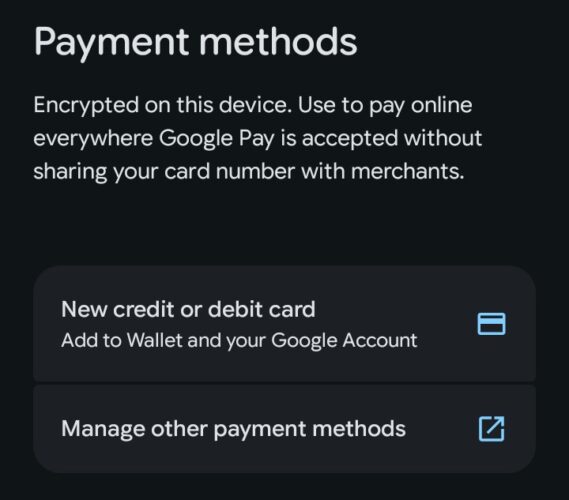
Once your card is set up, making payments is simple. Unlock your phone and hold it near the payment terminal. You’ll feel a vibration or see a confirmation when the payment goes through. Some terminals require you to open your payment app first, while others work automatically when your phone is unlocked.
NFC payments are secure because your actual card number never gets transmitted. Instead, your phone creates a one-time token for each transaction. Even if someone intercepts the NFC signal, they can’t use that information for future purchases. You’ll also need to unlock your phone or verify with a fingerprint or PIN for most transactions, adding another layer of security.
Sharing Files via Android NFC
Android Beam used to be the primary method for sharing files via NFC, but Google removed it in Android 10. Now, NFC on Android works mainly as a trigger to initiate faster file transfers through Bluetooth or Wi-Fi Direct. When you tap two Android phones together with NFC enabled, they establish a connection and switch to a faster protocol for the actual file transfer.
To share files, make sure both phones have NFC turned on. Open the file you want to share, whether it’s a photo, contact, or document. Tap the two phones back-to-back. You’ll feel a vibration, and a prompt will appear asking you to confirm the transfer. The phones then use Bluetooth or another method to complete the file transfer at higher speeds.
The Bottom Line
Understanding what NFC on Android is opens up convenient features you might not have known existed. From tap-to-pay transactions that speed up checkout lines to quick device pairing and file sharing, NFC makes everyday tasks simpler.
The technology requires almost no setup beyond flipping a switch in your settings, and it’s secure enough for financial transactions. If your Android phone has NFC capability and you’re not using it yet, enabling it takes seconds and immediately adds practical functionality to your device.
Does NFC drain my Android battery?
No. NFC uses minimal power and only activates when your phone is near another NFC device or tag. Leaving NFC enabled won’t noticeably affect your battery life. The feature stays dormant until you bring your phone close to a payment terminal or NFC tag.
Can someone steal my credit card information through NFC?
No. NFC payments use tokenization, which means your actual card number never gets transmitted. Each transaction creates a unique, one-time code that’s useless if intercepted. The extremely short range of NFC (a few centimeters) also makes it nearly impossible for someone to intercept your payment data remotely.
Do all Android phones have NFC?
Most Android phones manufactured after 2015 include NFC, especially mid-range and flagship devices. Budget phones sometimes skip NFC to cut costs. Check your phone’s Settings under Connected Devices or Connections to see if you have an NFC option. You can also check your phone’s specifications on the manufacturer’s website.
Why won’t my NFC work for payments even though it’s enabled?
Your phone case might be blocking the NFC signal. Try removing it and testing again. Make sure you’ve set up a payment app like Google Pay and added a card. Some payment terminals require you to unlock your phone first or hold it in a specific position. The NFC antenna is usually located on the back of your phone near the camera.


Improve this guide
User forum
0 messages