
Samsung Galaxy XR Headset Features Explained

 4 min. read
 Updated on
The wait is finally over. Samsung has officially stepped back into the world of wearable tech with the Samsung Galaxy XR. Packed with cutting-edge technology, the Samsung Galaxy XR features a mix of high-end hardware and deep Google AI integration, positioning it to take on heavy hitters like the Apple Vision Pro and Meta Quest 3 in the “spatial computing” war.
Priced at $1,799, it isn’t exactly a budget buy, but it undercuts the Vision Pro significantly while packing some seriously impressive tech. Here are the standout Samsung Galaxy XR features that make this headset a potential game-changer.
Dual 4K Micro-OLED Displays
The visual experience is where the Galaxy XR really shines. It features dual Micro-OLED displays with a resolution of 3,552 x 3,840 pixels per eye, delivering a total of approximately 27 million pixels—slightly more than the Vision Pro’s 23 million.
- Clarity: With high pixel density, the “screen door effect” is essentially gone.
- Refresh Rate: It defaults to a smooth 72Hz but can ramp up to 90Hz for high-intensity gaming or professional apps.
- Immersive FOV: You get a wide 109° horizontal field of view, making virtual screens feel truly massive.
Powered by Android XR & Gemini AI
This isn’t just a screen on your face; it’s an AI-native powerhouse. The headset runs on the brand-new Android XR platform, giving you access to a massive library of Google Play Store apps optimized for 3D space. That means you can…
- Ask Gemini about anything you see in the real world through the cameras.
- Use Circle to Search on physical objects in your room.
- Get Live Translations that appear as captions over people as they speak.

The Snapdragon XR2+ Gen 2 Chipset
Under the hood, Samsung is using Qualcomm’s latest Snapdragon XR2+ Gen 2. This chip was specifically designed to handle the heavy lifting of high-res passthrough and complex multitasking. Paired with 16GB of RAM, the headset is built to run several “infinite desktop” windows around any room.
Precision Tracking & Hand Gestures
One of the coolest aspects of any XR headset is how well it tracks your body and understands your environment. The Galaxy XR doesn’t disappoint here. It uses an array of 12 cameras strategically placed around the device to deliver precise, lag-free tracking of both your movements and the room around you.
- Look-to-Select: Four interior cameras track your eyes, so you can highlight buttons just by looking at them.
- Hand Tracking: Six world-facing cameras allow you to pinch, swipe, and scroll through the air with zero lag.
- Spatial Mapping: Two passthrough cameras and dedicated depth sensors ensure virtual objects stay “pinned” exactly where you put them on your desk or wall.
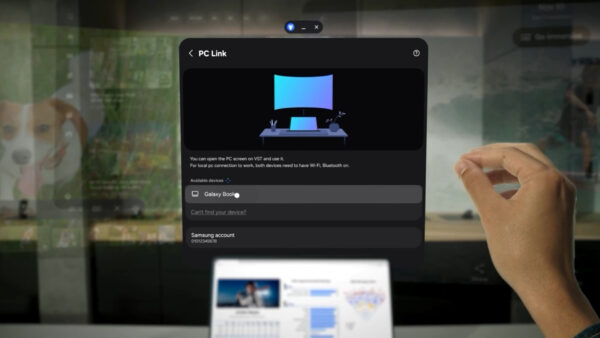
Galaxy Ecosystem & PC Connect
If you’re already invested in Samsung’s hardware ecosystem, the Galaxy XR becomes even more compelling. Samsung has designed the headset to seamlessly integrate with your existing Galaxy devices and Windows PC, creating a unified experience that extends across all your tech.
- PC Connect: You can link your Windows PC to the headset and pull your entire desktop into your virtual space.
- Smart View: Take a call on your Galaxy phone and instantly “toss” the video over to the headset.
- Likeness: For video calls, the headset can create a realistic digital representation of your face that mirrors your expressions in real-time.
The Bottom Line
The Samsung Galaxy XR features mark a shift from simple virtual reality toward a truly intelligent spatial computer. By combining high-fidelity 4K passthrough with the system-level integration of Gemini AI, Samsung has created a device that doesn’t just display information… it understands it.
From using Travel Mode to turn a flight into a private cinema to converting your old photos into immersive 3D memories, the Galaxy XR is designed to blend into your life. It isn’t just about hardware; it’s about an AI-driven ecosystem designed to make the digital world feel as natural as the physical one.


Improve this guide

User forum
0 messages